Tuesday, August 5, 2014

wpDataTables FREE version!

Hi, guys!


wpDataTables Free Download


Good news to everyone who would like to try out wpDataTables for free – we introduce a limited giveaway of lite version of the plugin – this is a version that you can and use download completely for free!

wpDataTables Lite is a completely free version of wpDataTables WordPress table plugin.


It doesn’t have all the power that full version of wpDataTables has, but still can do a lot! With free version of wpDataTables you can:


  • Create WordPress tables based on MySQL

  • Create WordPress tables based on Excel files

  • Create WordPress tables based on CSV files

  • And a lot more!

Hurry – the offer is limited and will be closed soon.


Please keep in mind that we will provide support and updates only for the full version.


So, THIS is the free download link. Enjoy!


wpDataTables FREE version!

Sunday, August 3, 2014

Updates to wpDataTables!

We have two good news on wpDataTables!


First one is that we finally published a PDF version of documentation (will be included with the plugin from now on). It has more then 160 pages, and it explains all the plugins features with illustrations and in complete details. You can download it here.


Second one is an update (current version is 1.5.2), which introduces these features and fixes that many of you asked for:


  • Reorganization of files – files in wpDataTables plugin are now reorganized. Now each block of actions has its own controller and folder, so it’s easy to find if you need to change something (see documentation section 1.2 for folder structure details). Also, all “.inc” files are changed to “.inc.php” for the servers that do not allow non-standard file extensions.

  • Hooks and filters – now there are 70 WordPress actions and filters used in the plugin – so you can extend the plugin for your needs without any worries that the changes will be overwritten with next versions. Detailed descriptions are in the chapter 11 of the documentation.

  • Backend design changes – wpDataTables got a better admin panel design, and some usability improvements.

  • Duplicate table – Now you can easily create a duplicate of each table you want, using a “Duplicate table” button on the browse section of the admin panel. This can be handy if you need to have several similar tables.

  • Shortcode attributes and placeholders – Now each wpDataTable shortcode can have up to three variables, which you can use in MySQL query or default filter values E.g. if you set the shortcode like [wpdatatable id=33 var1=23 var2=43] you can use placeholders %VAR1% and %VAR2% in the table setup. This might come in handy if you want to e.g. have one table with different predefined filter values on several pages.

  • Default values for the column – Now each column can have predefined default values that will be used in the advanced filter, and in the editor for the editable tables.

  • Empty tables are now editable – Before you couldn’t edit a table after you delete all rows from it. This issue is fixed now (but please keep in mind that the MySQL table should have a couple of rows when you create an editable wpDataTable based on it).

  • Internationalization support – Now wpDataTables plugin supports .PO/.MO internationalization. “languages” folder contains the subfolders for current locale.

  • Front-end editing restriction for selected roles – As of this version when defining a table as editable you can select user roles that will be able to edit each table. Or you can leave this setting blank if you want to allow editing for everyone (as it was before).

  • Clear filters – Widget filter now has a “Clear filters” button which refreshes all the filter settings.

  • Checkboxes filter bugfix – problems with checkbox filter fixed.

  • Empty dates bugfix – front-end editor had problems with empty dates, which are fixed now.

1.6 version is in progress – with a long-awaited Table Constructor feature, which will allow you to create and edit tables within wpDataTables without need to use PHPMyAdmin or other MySQL manager.


Thank you for purchases and see you soon with more news!


Updates to wpDataTables!

Wednesday, March 12, 2014

Custom WordPress Plugins from Creators of wpDataTables

We’re on Microlancer! We offer custom WordPress plugins development and modification.


Custom WordPress Plugins

Hi guys,

We would like to let you know that if you like wpDataTables plugin, but it does not do exactly what you want: e.g. if you want a more complicated filter, or if you would like to have a special unique design you can offer customization from us.

Also if you like the plugin, and you want something not related to wpDataTables – any custom WordPress plugins – such as: custom data manipulation, user management, external database management, filters, contact forms – whatever else – you can also order it from us.
Contact us on Microlancer!


Wish you all the best :)


Custom WordPress Plugins from Creators of wpDataTables

Custom WordPress plugins from creators of wpDataTables

We’re on Microlancer!


200-microlancer

Hi guys,

We would like to let you know that if you like wpDataTables plugin, but it does not do exactly what you want: e.g. if you want a more complicated filter, or if you would like to have a special unique design you can offer customization from us.

Also if you like the plugin, and you want something not related to wpDataTables – any custom WordPress plugins – such as: custom data manipulation, user management, external database management, filters, contact forms – whatever else – you can also order it from us.
Contact us on Microlancer!


Wish you all the best :)


Custom WordPress plugins from creators of wpDataTables

Monday, March 10, 2014

Creating a CRUD system in WordPress

What is a CRUD system?


Creating a CRUD system in WordPress


The abbreviation CRUD comes from Create, Update, Update, Delete – which, in other words, means a data management system. In web terms it would most probably mean a piece of software which allows you to manage entries in your database, usually MySQL, PostgreSQL, MS SQL, or other.


A great, and, maybe, the most popular example of a CRUD system is phpMyAdmin – excellent software that is used by almost every web developer to manage MySQL data online.


Why would you need a CRUD system in WordPress?


WordPress itself is a powerful CMS (Content Management System), which is a specific kind of CRUD system, but sometimes you encounter a situation when you need to manage database data directly from WordPress front-end. Among others it can be one of these situations:


  • You would like to have a bugtracker on your WordPress site

  • You want to allow some of the users to edit some data from your site front-end without allowing them to see your WordPress site admin panel.

  • You have a requirement to allow some users to edit a DB table, e.g., modify a placed order, edit some personal data, etc.

And similar requests.


How to integrate a CRUD system in your WordPress site?


The easiest solution – try to find a suitable plugin


First – make sure you really need one. Many of the tasks are typical and you can probaly find a plugin that would suit your needs. E.g. if you need a bugtracker, as mentioned above, you can check and download this or this one. And if you need something more generic, like editing different MySQL tables from WordPress front-end, try wpDataTables – you can see here how the front-editing works, it is also fully responsive. You can purchase the plugin herehere.


If you still need one, you’d need to do some serious development to get it done.


Start a new WordPress plugin


If you think that no plugin fits your needs, create your own one! Start by reading this nice tutorial on creating a WordPress plugin from scratch.


You would need these plugin components:


  • A front-end which would render the data and the editor.

  • Javascript (jQuery) code which would send the data to the server and receive it from there.

  • AJAX action hook in your plugin’s PHP code which would do the actual CRUD actions on the back-end.

  • A configuration file, or, better, a back-end WordPress Admin panel page which would “tell” the plugin which tables to modify, and which SQL queries to do (in case you use a MySQL table).

It is also possible to implement this without AJAX – but non-AJAX crud systems look obsoltete nowadays.


Creating a CRUD system in WordPress

Best WordPress Plugins for Pricing Tables - Free and Premium

Wondering how to put some pricing tables in WordPress? Not sure which plugin to use?


In this article I would like to go through most popular plugins for publishing pricing tables on your WordPress site. Some of them are free, some of them are premium – you can compare and decide which suits your needs the best.


Small Feature Pricing tables in WordPress


Best WordPress pricing tables plugins


One of the most common requests – placing a small feature pricing table on your WordPress site. Of course, whenever you sell some products, or some services – doesn’t matter if that’s hosting services, or cleaning, or whatever else – feature pricing table is a great way to show your offer, to compare components or features, and to motivate the users to purchase.


When you have 3-4 main offers that you would like to feature on your site, this may be the best solution for you.
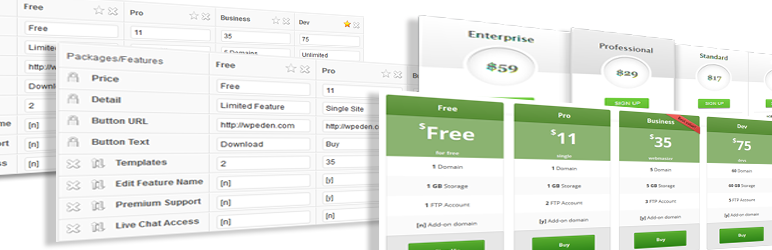

WordPress Pricing Table


Best WordPress Pricing Tables Plugins


This is a free plugin offered on WordPress.org – very popular among the users. Forms nice pricing tables with links, which you can customize if you’re familiar with CSS, and which you can manage from WordPress admin panel. For each column you can define name, price, features and purchase button. Excellent solution for basic tables.


Price: Free


Download link: Pricing Table on WordPress.org


Easy Pricing Table


Best WordPress Pricing Tables Plugins


Easy Pricing Table is another nice plugin featured for free on wordpress.org, one of the main advantages is that the generated pricing tables are responsive. Plugin is well-tested, generating nice clean tables which show nicely both on desktops and mobiles. You can set for each offer a name, price, features, button text, and URL. What else would you need for a simple pricing table? :)


Price: Free


Download link: Pricing Table on WordPress.org


Go – Responsive Pricing & Compare Tables for WP


Best WordPress Pricing Table Plugins


When you’re ready for something more serious then a generic table you might consider purchasing and using a premium plugin. Go – Responsive Pricing & Compare Tables for WP is a commercial plugin which offers you more then you can probably think about for pricing tables: responsiveness, unlimited color mixtures, 90+ starter templates, team viewer and compare table, video support, paypal button support, admin panel with tons of features, visual shortcode editor, customizable responsivity, etc.


Price: $17


Purchase link: Go – Responsive Pricing & Compare Tables for WP


Go – Responsive Pricing & Compare Tables for WP


Best WordPress Pricing Table Plugins


When you’re ready for something more serious then a generic table you might consider purchasing and using a premium plugin. Go – Responsive Pricing & Compare Tables for WP is a commercial plugin which offers you more then you can probably think about for pricing tables: responsiveness, unlimited color mixtures, 90+ starter templates, team viewer and compare table, video support, paypal button support, admin panel with tons of features, visual shortcode editor, customizable responsivity, etc.


Price: $17


Purchase link: Go – Responsive Pricing & Compare Tables for WP


CSS3 Responsive Web Pricing Tables Grids For WordPress


Best WordPress Pricing Table Plugins


This plugin is more then just pricing tables – it’s pricing grids! It pre-packs for you a lot of presets of CSS3 pricing grids, more then 20 color schemes, extensive admin panel with live configuration, responsive mode configurator, sliding columns feature, expandable rows feature and much more.


Price: $16


Purchase link: CSS3 Responsive Web Pricing Tables Grids For WordPress


wpDataTables – responsive tables in WordPress


Best WordPress Pricing Table Plugins


All the plugins above are cool when you have 3-5 products or services that you would like to show to your clients. But what about if you want to publish a big pricing table, where your users could filter out products by price, name, sort them, and so on? wpDataTables is the plugin suitable for that! It will allow you to publish a pricing table with unlimited number of rows – even if you have several thousands of products in your database. It has tons of features: responsive mode, powerful admin panel, it accepts different data sources – starting from Excel and CSV files to MySQL queries and XML or JSON data. Check out the demo!


Price: $25


Purchase link: wpDataTables – responsive tables in WordPress


I hope this article was helpful to you and would assist you to choose the best solution for pricing tables on your WordPress website. Thank you for reading! :)


Best WordPress Plugins for Pricing Tables - Free and Premium